Overall Architecture
Actual architectures differ from developer to developer, but they can almost all be regarded as variations of a single generic approach that emphasizes reliability, scalability, and maintainability. Figure 2.1 illustrates this overall architecture.
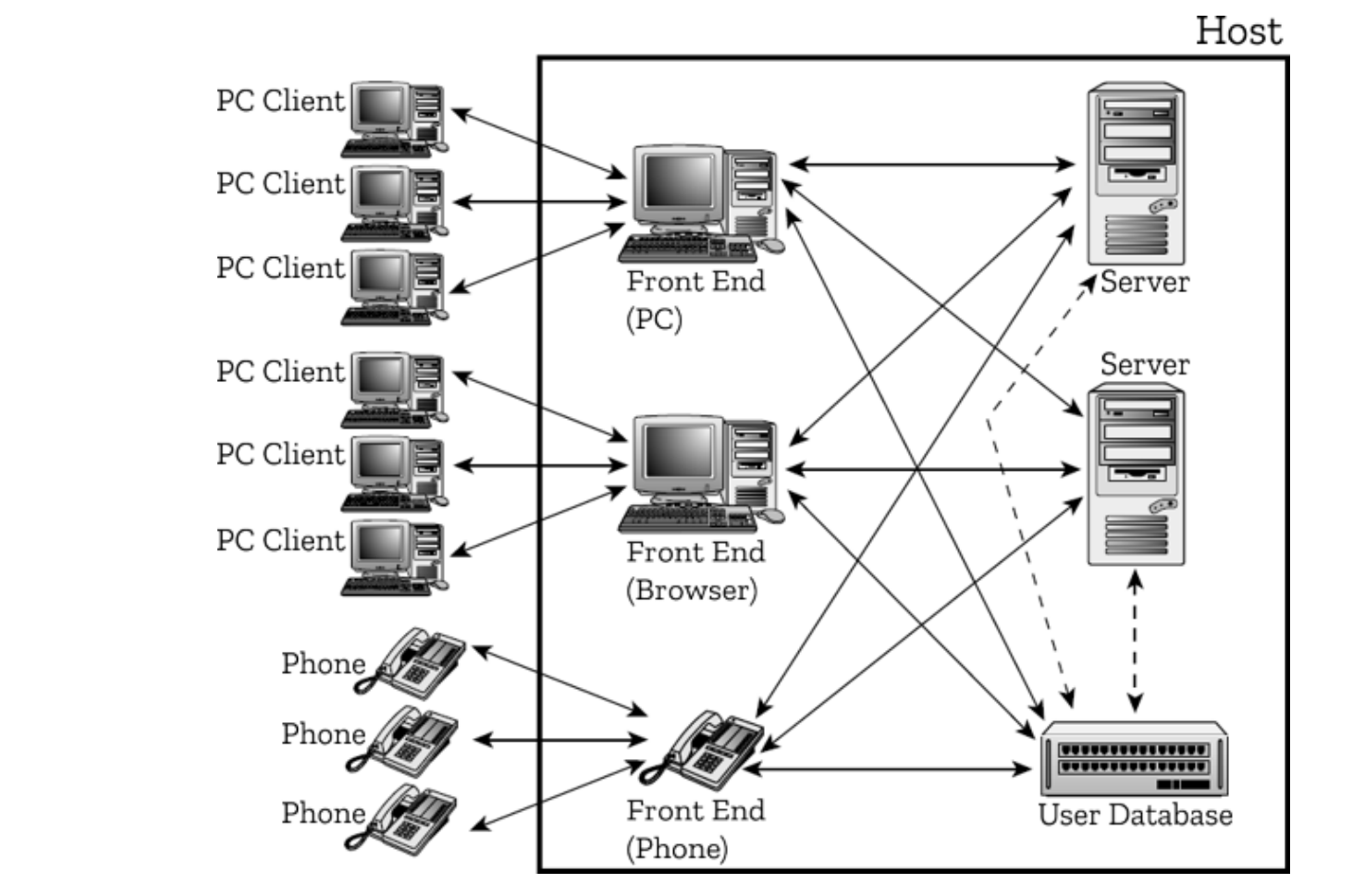
Figure 2.1 Overall architecture.
Here’s how it works.
Central to the system is the user database. This is a powerful piece of software running on its own, fast machine with lots of storage. It contains records for all the players registered for the virtual world. Before anyone can access content, they must first log in; this means checking with the user database. Other parts of the complete system (not shown in Figure 2.1) for billing, customer service management, and patching also have access to the user database. It’s a very important, industrial-strength system, and is therefore usually bought in rather than programmed in-house.
Players have a number of options for connecting to the virtual world. The main one is to use a client from a PC (or console or Macintosh or Linux box—the clients will all present the same interface, so the virtual world neither knows nor cares what operating system they’re running under). Players may also connect to the host by using a browser, but not to the same extent as with a bespoke client; although there are text-based virtual worlds that do have good browser-based (Java) clients, no-one has yet been reckless enough to try the same kind of thing for a full-blown 3D graphics-based one. Similarly, mobile phones fall way short of being usable for actual play. However, both browsers and phones can be used to obtain information from a virtual world (for example, news, the virtual weather) or to make changes to standing orders (for example, training regimes, the prices of goods offered for sale). Phones and email can be used to inform players of unfolding events, but they don’t usually offer the chance to participate in them.
When an incoming connection is established, it is handled by a front end. Front ends can communicate with both their target platform (client, browser/email, mobile phone) and the user database. Figure 2.1 shows the various front ends as separate entities because they’re separate processes; however, in practice they may be consolidated onto a single machine or be split across several (for example, by real-world geography).
Individual incarnations of virtual worlds run on server clusters (also known as shards 1).
The architecture of shards is described in detail shortly, but for the moment a shard can be regarded simply as a unitary server entity. Having approved a player for access to content, the front end will either query the server to which the content relates (for browser or phone connections), or pass control to the server itself (for client connections). The server does not need to access the user database in order to support the virtual world, because servers deal with characters rather than players. Customer support staff, however, deals with players rather than characters, so they do need to be able to check the user database from within the virtual world. This is sometimes done using a separate database tool that they can invoke while simultaneously using the regular client, but not always. In particular, if the client owns 2 the player’s PC, a special admin client is needed with the database tools built in.
If this is so, then either the client has to be able to maintain two connections (one to the server, one to the user database) or—more easily—the server itself can issue database requests when required, passing the results back to the client.
This term is an Ultima Online fiction to explain how come there are multiple copies of a supposedly single world. It’s as if a mirror that reflected the world was shattered into a myriad of tiny pieces, each such shard reflecting the original world but in a slightly different way. ↩︎
In the sense of allowing no other processes to run while the client is running, thereby making life difficult for hackers. It also makes life difficult for non-hackers, though, so clients may settle for merely owning the screen. Players still don’t generally appreciate the gesture. ↩︎